This documentation explains how the compliance status of a Control Library is determined and details the events that trigger updates to the Modified Date and Modified By fields.
1. Understanding Control Library Compliance Status
The Control Library detail page features a Compliance Status section, which evaluates four specific criteria to determine the overall implementation status. For each criterion, a "Green Check" indicates compliance with the defined requirement.
Compliance Criteria and Requirements
* Note: Evidence/Document Request is linked through the internal control not directly to the control library.
Implementation Status Determination
The overall Implementation Status is derived from the results of the four criteria checks. The logic follows a hierarchical path as shown below .
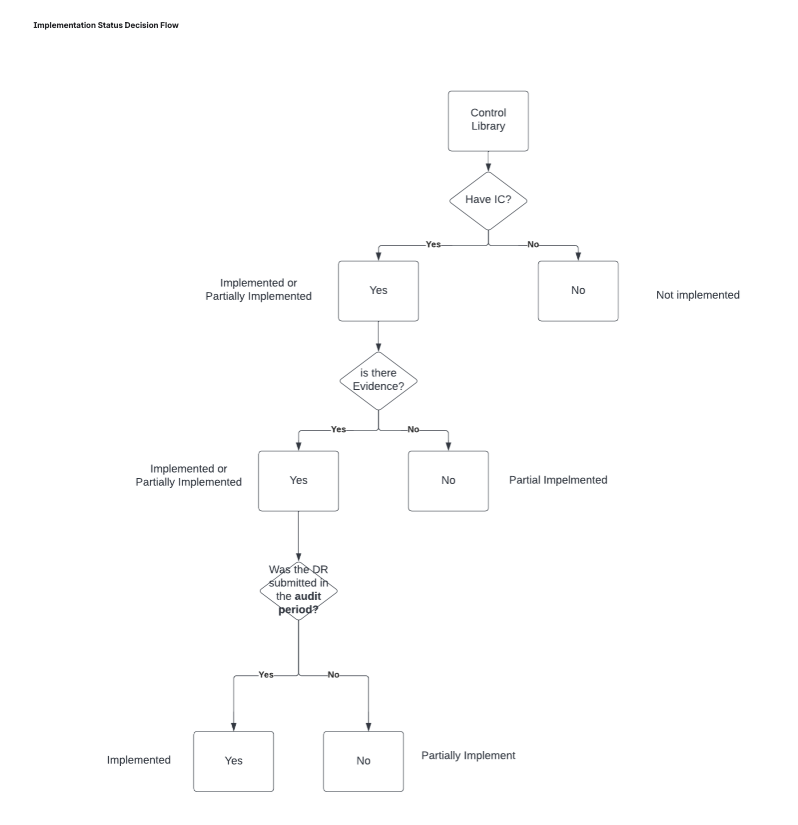
2. Changes to Modified Date and Modified By Fields
The Modified Date and Modified By fields are automatically updated whenever a significant change impacts the Control Library’s compliance status or related linkages.
Updates to these fields occur under the following four conditions:
Internal Control Linkage: When you link/unlink an internal control to the control library.
Policy Linkage: When you link/unlink a policy to the control library.
Manual Sync: When you perform a manual sync using the designated gadget/button. This is used to auto-sync the Evidence and Document Request status if they have been submitted. Clicking this button will update the timestamp and the Modified By user.
Scheduled Job: A scheduled job runs to check the compliance status every six hours. If this job detects a change in the status of any criteria, it will automatically update the Modified Date and Modified By fields.
Was this article helpful?
That’s Great!
Thank you for your feedback
Sorry! We couldn't be helpful
Thank you for your feedback
Feedback sent
We appreciate your effort and will try to fix the article