Ask C1Risk serves as an enterprise-grade AI GRC analyst assistant embedded directly within the C1Risk platform. Rather than functioning as a generic conversational chatbot, Ask C1Risk directly interfaces with authorized platform records to streamline compliance research, accelerate audit reporting, and conduct sophisticated risk analyses grounded in verified system data. By integrating real-time platform awareness with advanced language model processing, Ask C1Risk enables compliance officers, risk managers, and auditors to transform static GRC data into actionable intelligence.
1. Feature Overview & How to Use the Chatbot
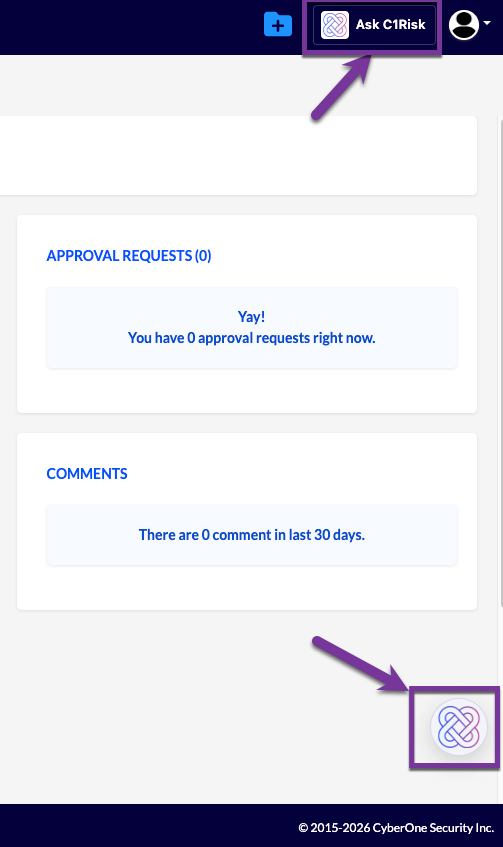
Access Methods & User Interface Navigation
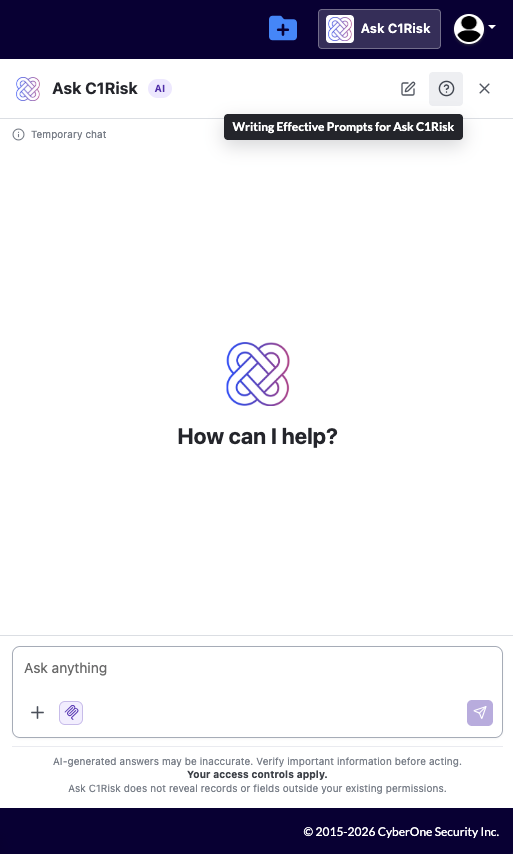
Users can access the Ask C1Risk interface via two distinct navigation entry points from any location within the application. For immediate assistance with prompt engineering, an embedded link within the chatbot header ("get help") directs users directly to the official Freshdesk knowledge base article on prompt construction.
Access Method | UI Location / Action | Operational Purpose |
Top-Right Platform Menu | Main top-right platform navigation header -> Click "Ask C1Risk" | Primary access point for dedicated analytical sessions alongside routine platform navigation. |
Floating Launcher Icon | Bottom-right corner of the interface -> Click floating chatbot icon | Quick-access entry point for rapid inline record querying during active GRC workflows. |
Search Capabilities & Data Source Architecture (MCP vs. Web Search)
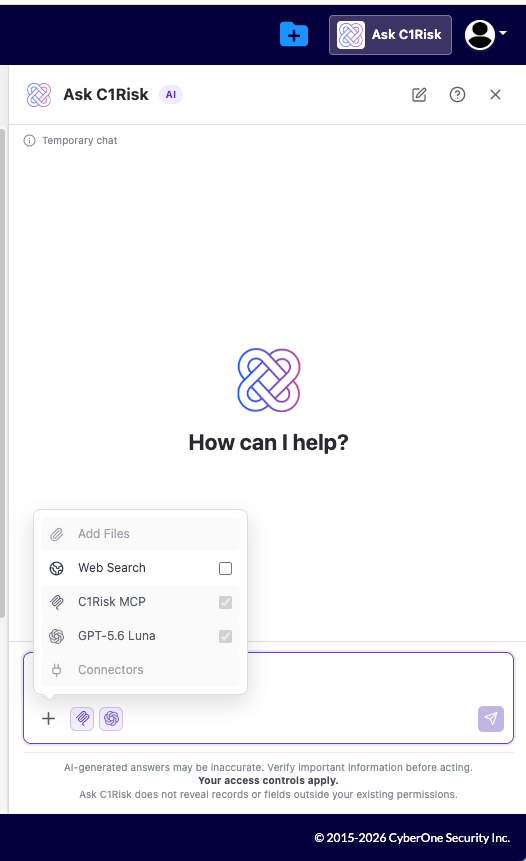
Ask C1Risk utilizes a dual-engine architecture to handle internal platform queries alongside external intelligence gathering while preserving strict operational boundaries:
- Model Context Protocol (MCP) Server: By default, Ask C1Risk queries operate through C1Risk's internal MCP server. This protocol allows the chatbot to securely inspect structured platform record relationships (e.g., mapping Internal Controls to Evidence, Document Requests, and Risk Register ) in real time without exposing underlying tenant data to third-party services.
- External Web Search Toggle: Located directly within the chat interface, the Web Search toggle allows users to optionally expand search parameters beyond internal platform boundaries. When enabled, users can research newly released regulatory guidance, external threat benchmarks, or standard framework updates (such as ISO/IEC or NIST publications) and synthesize those external insights with internal C1Risk record facts without commingling or overwriting tenant records.
Real-Time Execution Management & Timer Controls
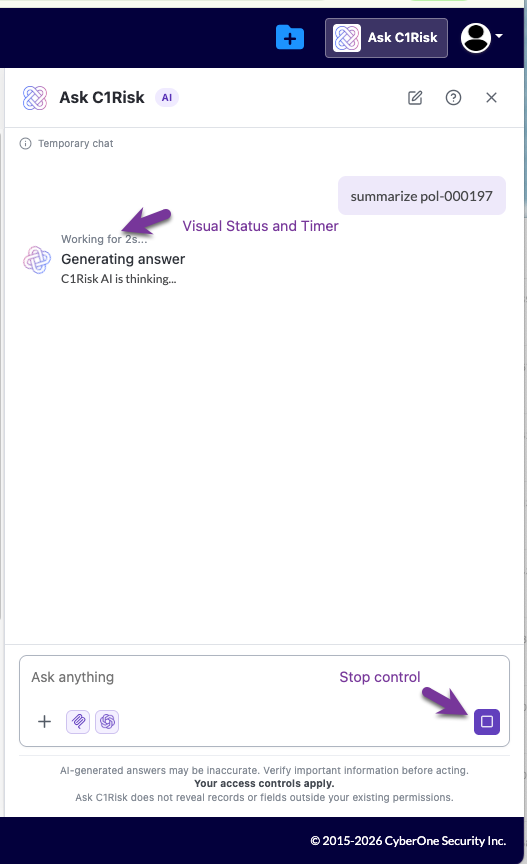
To maintain full operational visibility during complex database evaluations (such as executing queries like "summarize pol-000197"), Ask C1Risk provides dynamic feedback throughout the processing lifecycle:
- Visual Status Icon: Appears immediately upon prompt submission to signal active data retrieval and context assembly across the MCP server.
- Real-Time Execution Timer: Displays a continuous counter tracking processing duration down to the second, offering full transparency into response generation time.
- Stop Execution Control: Allows users to halt an in-flight query midway if search criteria need adjustment or if the prompt requires immediate refinement, preventing unnecessary token consumption.
Interactive Record Links & Follow-Up Navigation
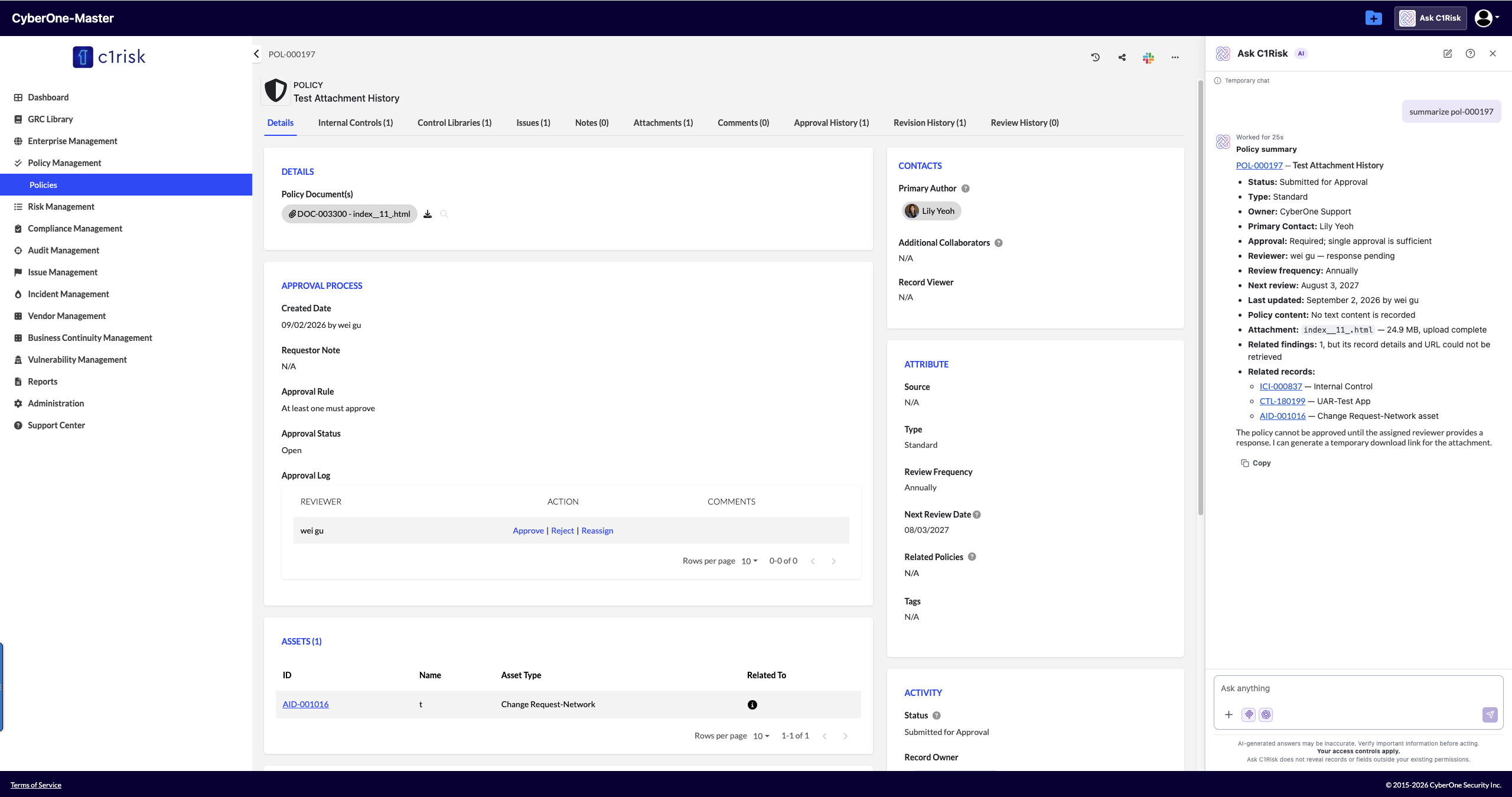
All output generated by Ask C1Risk includes direct, clickable hyperlinks to referenced C1Risk records (e.g., ICI-000836, RSK-000118, DRI-006415). Clicking these hyperlinks opens the target record in the platform, allowing risk and audit teams to transition seamlessly from macro-level conversational insights to detailed micro-level record management. Users can then continue the session by posing iterative follow-up questions to explore underlying dependencies or refine analytical findings.
Temporary Chat Session Privacy & Data Hygiene
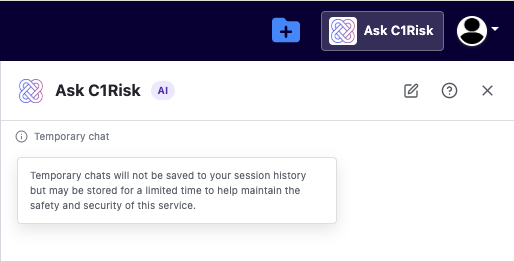
Ask C1Risk operates under a strict temporary privacy model designed to satisfy enterprise data hygiene and privacy standards:
Ephemeral Session Memory: Chat sessions do not maintain or persist historical logs across user sessions. Closing the chatbot panel or initiating a New Chat permanently purges all active session memory. From a GRC perspective, this non-persistent architecture ensures that sensitive audit findings, unmitigated risk evaluations, draft gaps, and temporary evidence notes are never retained in unencrypted client-side browser caches or cross-session memory models.
2. Core Highlighted Capabilities
a. Global Keyword Search Across Entities
Ask C1Risk enables cross-entity keyword searching across all active platform records
Search Execution Parameters
- Targeted Scope Filtering: Scope queries to specific active entity types (e.g., searching active Internal Controls, Policies, and Evidence for
"MFA"). - Time-Based Filtering: Restrict records by modification dates or operational timeframes (e.g., searching globally for Risk Register modified in the last 90 days from today, grouped by risk group, returning the top 20 matches).
- Exact Phrase Matching: Execute exact-match queries across platform records (e.g., searching all records for the exact phrase
"MFA"and returning record IDs and names only). - Two-Step Search Strategy: To optimize processing time and conserve model context tokens, request a compact match list prior to executing deep evaluations (e.g., search Findings, and Mitigations for overdue remediation. First return a compact match list, then analyze only the records I select.)
Performance & Token Optimization: Utilizing the Two-Step Search Strategy prevents unnecessary token consumption and context window crowding by isolating key Record IDs before generating detailed multi-record analytical summaries.
Refer to https://c1risk.freshdesk.com/support/solutions/articles/73000673788-keyword-search-prompt-examplesfor global keyword search prompt examples
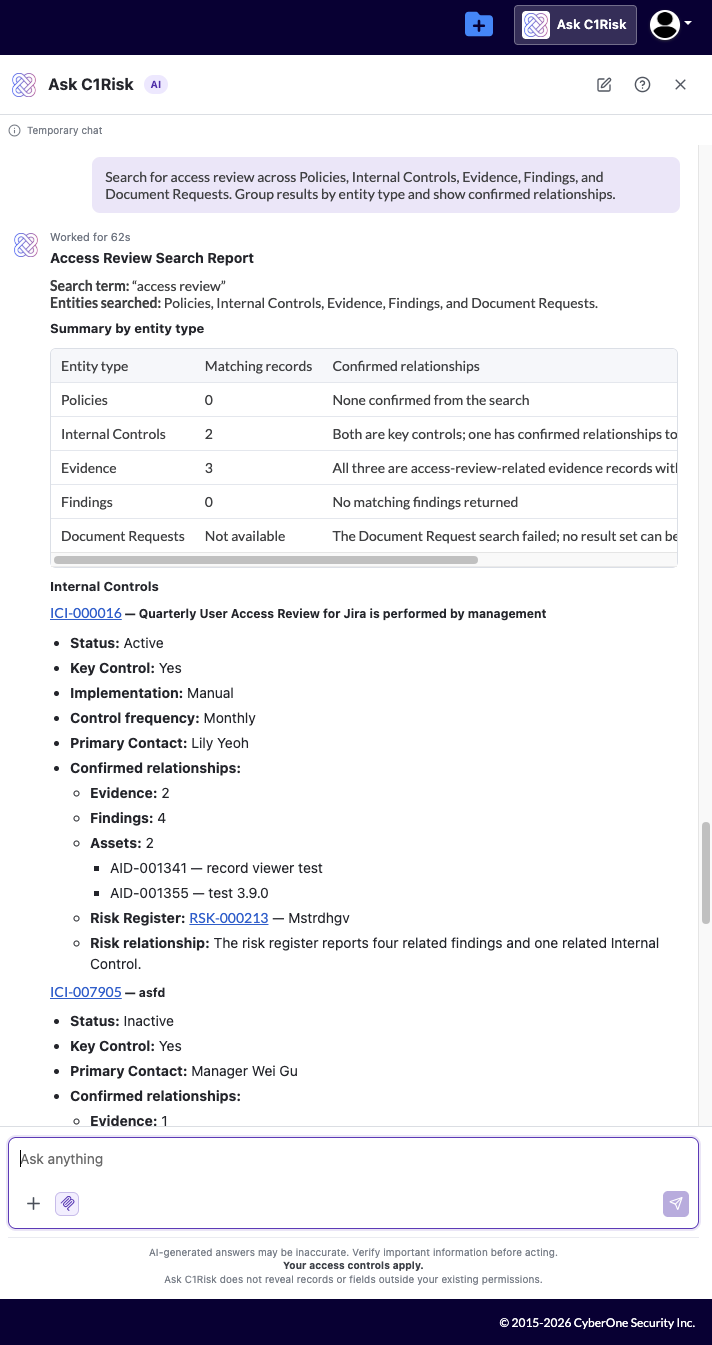
Global Keyword Search Example Prompt: Search for access review across Policies, Internal Controls, Evidence, Findings, and Document Requests. Group results by entity type and show confirmed relationships.
b. Customized Reporting Based on User Requests
Ask C1Risk structures output into specific, on-demand reporting formats tailored to immediate GRC operational requirements, including:
- Filtered reports for one entity, such as Internal Controls, Risks, Findings, Evidence, Audits, Vendors, or Incidents
- Custom columns, sorting, grouping, and date ranges
- Cross-entity reports combining related C1Risk records
- Compliance readiness and audit gap reports
- Control effectiveness and remediation reports
- Vendor and third-party risk reports
- Executive summaries and prioritized action lists
Refer to https://c1risk.freshdesk.com/support/solutions/articles/73000673786-ask-c1risk-custom-report-prompt-examples for custom report prompt examples
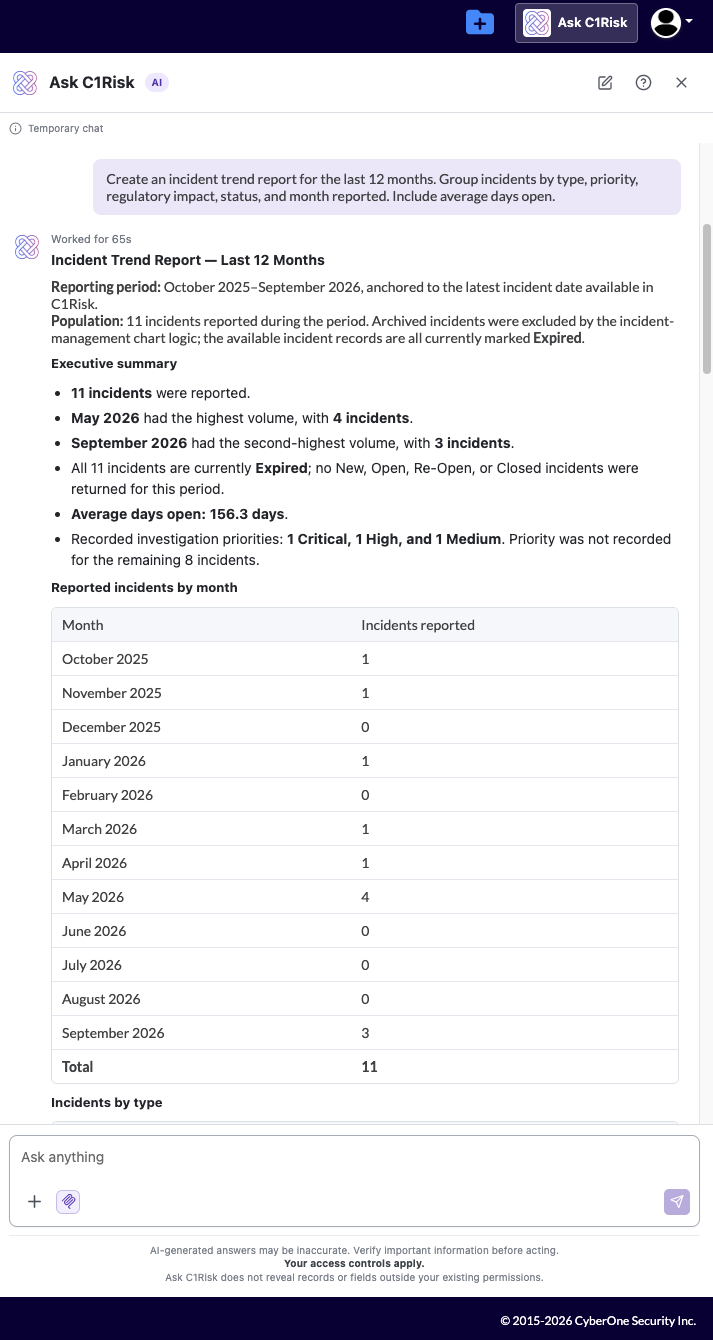
Custom Report Example Prompt: Create an incident trend report for the last 12 months. Group incidents by type, priority, regulatory impact, status, and month reported. Include average days open.
c. Deep GRC Compliance Analysis
Ask C1Risk evaluates complex GRC data while adhering strictly to verified record facts. The system operates under strict guardrails and will never fabricate risk ratings, control mappings, compliance conclusions, or missing evidence.
When performing complex evaluations, prompts can direct the system to structure its findings into a mandatory 6-part analytical breakdown:
- Evaluate control design and operating effectiveness
- Analyze inherent versus residual risk
- Identify root causes and recurring weaknesses
- Assess framework, audit, and compliance readiness
- Detect missing, stale, or insufficient evidence
- Analyze overdue Findings and Risk Mitigations
- Connect related records across C1Risk entities
- Prioritize remediation based on severity, exposure, ownership, and due dates
- Prepare executive summaries, audit analyses, gap assessments, and action plans
Refer to https://c1risk.freshdesk.com/support/solutions/articles/73000673787-deep-grc-analysis-prompt-examples for prompt examples
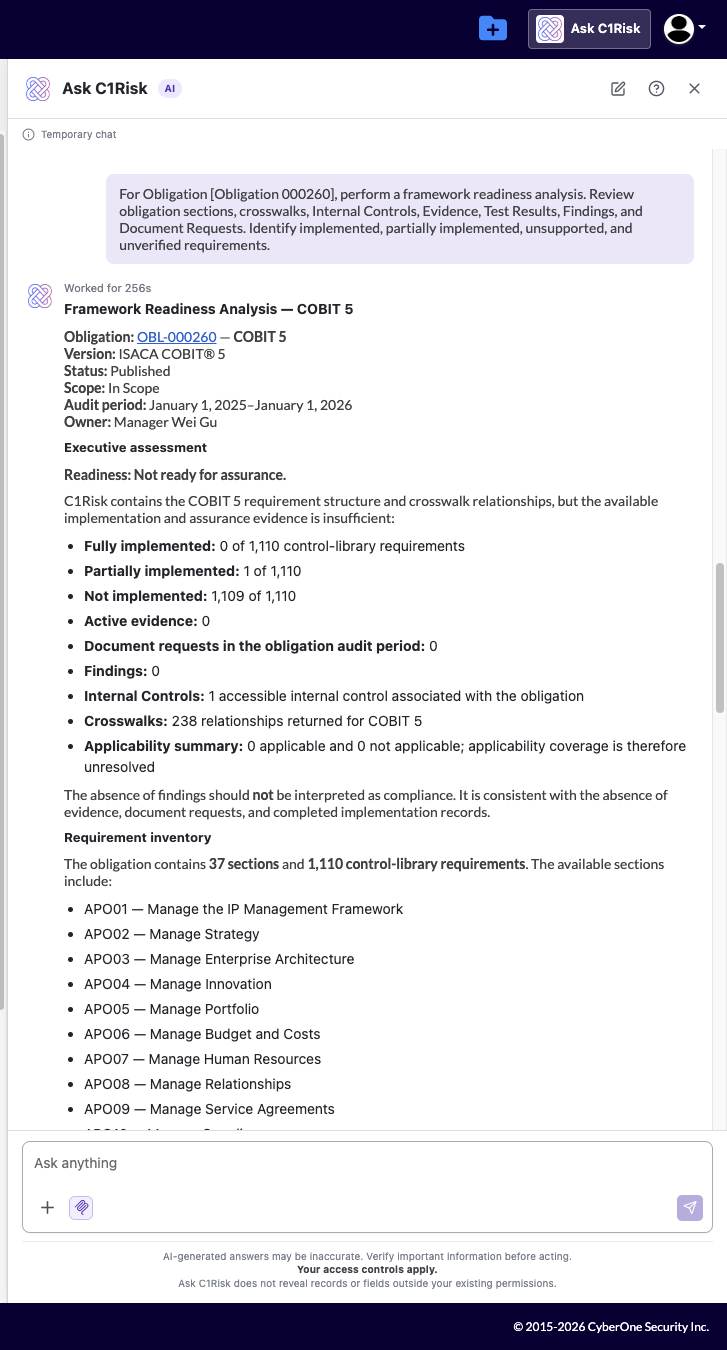
Deep Analysis Example Prompt: For Obligation [Obligation 000260], perform a framework readiness analysis. Review obligation sections, crosswalks, Internal Controls, Evidence, Test Results, Findings, and Document Requests. Identify implemented, partially implemented, unsupported, and unverified requirements.
3. Mastering Effective Prompt Engineering & Freshdesk Guidance
The Golden Rule & Standard Prompt Formula
The Golden Rule
An effective Ask C1Risk prompt adheres to three core principles:
- Specific: Clearly names target entities, Record IDs, or defined scope parameters.
- Context-Rich: Points directly to specific fields, relationships, subtabs, or assessment periods.
- Outcome-Oriented: Defines the exact output format, structural schema, and required actionable fields.
The Standard Prompt Formula
To achieve consistent, high-precision outputs across all platform entities, construct prompts using the following standard template:
"For [Entity] [Record ID] - [Record Name], analyze [Specific Data or Relationships]. Focus on [GRC Objective] and return [Desired Format], including [Gaps, Owners, Due Dates, or Recommendations]."
Refer to "Writing Effective Prompts for Ask C1risk" for more tips: https://c1risk.freshdesk.com/support/solutions/articles/73000673235-guide-writing-effective-prompts-for-ask-c1risk
Read-Only System Limits
Read-Only Operational Boundary: Ask C1Risk functions strictly as a read-only assistant. To maintain separation of duties, system integrity, and audit traceability, the chatbot cannot create, update, delete, deactivate, or link platform records. All record modifications must be executed through standard platform interfaces.
4. Security, Infrastructure & Data Privacy Assurance
Architecture & Isolated Cloud Boundary
Ask C1Risk utilizes OpenAI's GPT-5.6 Luna hosted via Amazon Bedrock. All prompt inputs, retrieved platform context, and model outputs remain strictly contained within C1Risk's dedicated AWS cloud boundary.
Zero External Data Sharing & Non-Training Guarantees
Strict Tenant & Model Isolation Guarantees:
- Zero Third-Party Data Transmission: Under Amazon Bedrock's managed architecture, model engines operate inside AWS-managed isolated execution environments. No data is shared with or accessible by OpenAI or any third party.
- No Model Training: Neither AWS nor OpenAI utilizes customer prompt inputs, contextual data, generated outputs, or platform interactions to train public or foundational models.
Network Isolation & VPC Security
- In-Tenant Processing: All data parsing and context assembly take place within C1Risk's isolated AWS infrastructure.
- Private Routing via AWS PrivateLink: Internal GRC data transmitted to Amazon Bedrock endpoints is routed through AWS PrivateLink (VPC Endpoints). Application traffic remains inside the AWS private network backbone and never traverses the public internet.
Encryption, Key Management & Data Retention
- Data in Transit: All network traffic between application components and Bedrock endpoints is protected using TLS 1.2+ encryption protocols.
- Data at Rest: Temporary operational logs, embeddings, and retrieval caches are encrypted using AWS KMS (Key Management Service) customer-managed keys.
- Zero Unnecessary Retention: Amazon Bedrock processes inference requests dynamically without persisting customer prompt data outside configured platform logging pipelines.
Compliance Frameworks & Legal Governance
Legal protections for Ask C1Risk are established under the AWS Service Terms (Section 50 - Generative AI Services), legally binding AWS to protect customer prompts and generated outputs against unauthorized model training or third-party access. C1Risk inherits AWS's underlying physical and environmental security controls, aligning with global regulatory requirements.
Security Dimension | Implementation Standard | Regulatory Alignment & Evidence Source |
Boundary Protection | AWS-managed isolated execution environment; zero data access or model sharing with OpenAI or third parties. | AWS Security, Privacy, and Responsible AI on Bedrock Documentation |
Network Security | Internal private routing via AWS PrivateLink (VPC Endpoints); application traffic completely isolated from public internet routes. | Amazon Bedrock Data Protection & VPC Isolation Guide; HIPAA Technical Safeguards § 164.312(e) |
Encryption & Key Control | TLS 1.2+ in transit; AWS KMS customer-managed keys for data at rest; dynamic inference without persistent storage. | Amazon Bedrock Security Overview; SOC 2 Trust Services Criteria (CC6.1, CC6.3, CC6.6) |
Legal & Compliance Governance | Enforced under AWS Service Terms (Section 50); inherited SOC 1, SOC 2, ISO 27001, and HIPAA compliance attestations. | AWS Service Terms & AWS Artifact Compliance Reports |
Was this article helpful?
That’s Great!
Thank you for your feedback
Sorry! We couldn't be helpful
Thank you for your feedback
Feedback sent
We appreciate your effort and will try to fix the article