Release Date: March 20, 2026
Release 3.8.0 introduces significant enhancements to communication workflows through new Slack direct messaging capabilities, introduces a "Record Viewer" contact type for secure read-only access, streamlines user experience with global usability improvements, and adds flexibility to Document Request workflows.
1. Slack Integration > Direct Messaging for Records
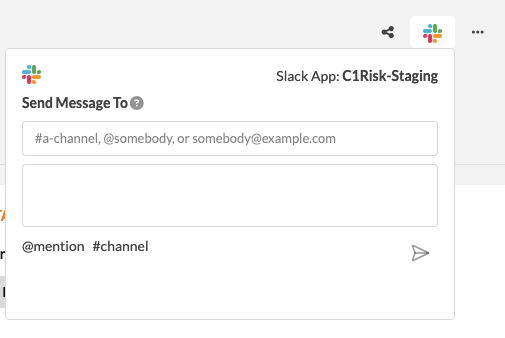
This release adds Direct Messages, a new way to reach colleagues or channels instantly from any record, without leaving C1Risk.
Direct Messaging: Users can send an ad-hoc message to one or more Slack users (@mention) or channels (#channel) directly from any configured record page.
Contextual Linking: Every message sent through the integration automatically includes a clickable deep-link back to the specific C1Risk record so recipients can immediately access the details.
Message History: The Slack component panel displays a running log of all messages sent from a specific record, including the recipient, timestamp, sender identity, and a link to open the Slack thread.
Setup Requirement: Administrators must add the new scope to the Bot Token Scopes in the C1Risk Slack App to enable this feature.
User Manual: https://c1risk.freshdesk.com/en/support/solutions/articles/73000666145-c1risk-slack-integration-user-guide
2. Record Viewer Contact Type
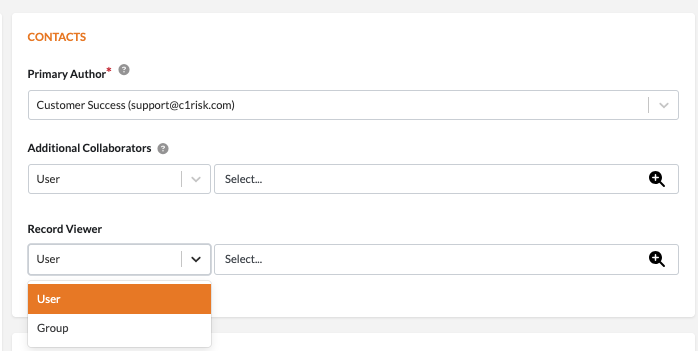
A new global "Record Viewer" contact type has been introduced to provide read-only access to records for users with limited roles, such as General or Vendor users.
Read-Only Access: If a user is assigned to a record solely as a Record Viewer, all "Edit" options, action menus, and "Add New" buttons in floating tables are disabled.
Group or Individual Assignment: Record Viewers can be assigned as individual users or as entire Groups.
Floating Table Security: If a logged-in user lacks permission to access a linked record listed in a floating table, the system removes the hyperlink to that record, allowing them to see the data values without granting drill-down access.
Bulk Operations: Users can perform bulk changes to Record Viewers from list views, enabling the ability to add, replace, or delete viewers across multiple records at once.
User Manual: https://c1risk.freshdesk.com/en/support/solutions/articles/73000666862-record-viewer
3. Global Usability Features
To improve system navigation and clarity, several global UI enhancements have been implemented.
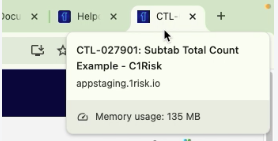
Subtab Record Counts: All subtabs within view detail pages now display the total record count. This allows users to immediately know if data exists within a subtab without needing to click into an empty tab.

Specific HTML <title> Tags: Browser tab titles now match the specific page destination and context (e.g., showing the Record ID and Name). This makes it significantly easier to navigate when multiple C1Risk records are open in different browser tabs.
Textarea Consistent Behavior: Textareas now feature TinyMCE to retain pasted formatting from other sources. Additionally, textareas default to "Show All" with a convenient "Show Less" option at the top to collapse long text.
4. Document Request Enhancements
The platform now allows greater flexibility for auditors and users to manage Document Request (DR) responses after submission.
Action Menu Addition: A "Re-Open Record" option is now available for DRs in Submitted, Submitted for Approval, or Approved status.
Automated Audit Trail: Re-opening a record automatically logs the event in the Review History subtab, tracking changes to files, URLs, and comments for full transparency.
Response UI Enhancements: The Uploaded files section within the Document Response has been upgraded to a floating table format, displaying file size, creation date, and actions to Preview, Download, or Delete the files.
User Manual: https://c1risk.freshdesk.com/en/support/solutions/articles/73000666863-re-opening-a-document-request
Was this article helpful?
That’s Great!
Thank you for your feedback
Sorry! We couldn't be helpful
Thank you for your feedback
Feedback sent
We appreciate your effort and will try to fix the article