C1Risk Version 3.13.0 introduces the Ask C1Risk AI Chatbot, a refreshed platform visual style aligned with ADA accessibility guidelines, flexible Obligation Scoping, and expanded history logs to cover all entities.
1. Platform Visual Style Change & ADA Accessibility Alignment
We have updated the visual interface across all primary modules in the C1Risk platform to enhance navigation, contrast, and overall usability:
- High-Contrast Focus Highlights: Updated visual accents—including high-visibility orange highlights on menu selections, header controls, and active dashboard icons—make navigation clearer and easier to identify.
- Unified Module Styling: Streamlined visual styling across Dashboard, GRC Library, Enterprise Management, Policy Management, Risk Management, Compliance Management, Audit Management, Issue Management, Incident Management, Vendor Management, and Business Continuity Management.
- Improved Task & Widget Visibility: Cleaner layout structures for key operational widgets such as My Tasks, Approval Requests, and Comments, optimizing readability across both active and zero-state views.
- Accessibility Alignment: These visual updates reflect the principles of federal accessibility frameworks, such as the Department of Justice's ADA Standards for Accessible Design, supporting barrier removal and ensuring consistent digital usability across organizational workflows.
- Please refer to https://www.ada.gov/law-and-regs/design-standards/ compliance requirement.
2. Ask C1Risk AI Chatbot
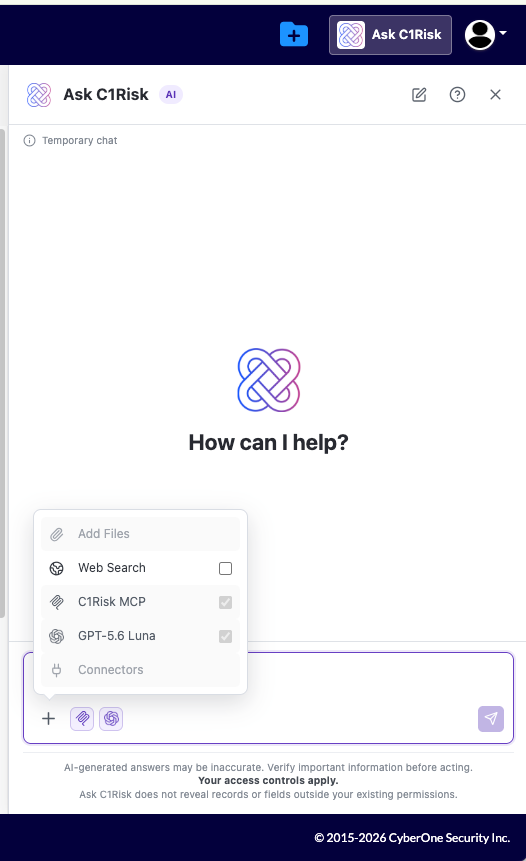
The new Ask C1Risk AI Chatbot is a read-only GRC analyst assistant built directly into the platform to help teams search, summarize, compare, and analyze data across their environment.
Key Features & Capabilities
- Dual Access Points: Launch the chatbot anytime via the top-right menu or the floating screen icon.
- Global Keyword Search Across Entities: Search across Internal Controls, Policies, Evidence, Findings, Risk Registers, Document Requests, Vendors, and Audits using targeted criteria or exact phrases.
- Customized Reporting: Request structured outputs tailored to your needs, including executive summaries, comparison tables, gap analyses, prioritized action lists, and draft reviewer notes.
- Deep GRC Compliance Analysis: Review linked policies, evidence attachments, and test results while separating verified record facts from recommendations. Compare controls against external frameworks like ISO/IEC 27001:2022 and NIST CSF 2.0.
- User Controls & Privacy: Includes an external web search toggle, direct clickable record links, a real-time timer with a stop button, and temporary chat sessions that clear history upon closing or starting a new chat.
- Freshdesk Prompt Tips: Access our knowledge base guide ("Writing Effective Prompts for Ask C1Risk") via the in-app "Get help" link for prompt formulas and best practices.
- Enterprise Security & Data Isolation: Powered by OpenAI's GPT-5.6 Luna via Amazon Bedrock, all interactions remain strictly within C1Risk's dedicated AWS cloud boundary with zero third-party data sharing or model training, AWS PrivateLink (VPC Endpoints) routing, and TLS 1.2+ / AWS KMS encryption.
- Please refer to https://c1risk.freshdesk.com/support/solutions/articles/73000673775-ask-c1risk-ai-chatbot-customer-manual-release-guide
3. Obligation Scoping
A dedicated Scoping component is now available in the Obligation section to give compliance teams finer control over obligation categorization:
- Optional Usage: Scoping is optional for organizations, and all obligation records default to a scope status of NA.
- Configurable Scope Statuses: When editing an obligation, administrators can select:
- Under Review: Marks the obligation as currently under evaluation.
- In Scope: Designates the obligation as active and records the specific In Scope Date.
- Out of Scope: Designates the obligation as inactive and records the specific Out of Scope Date.
- Control Library Visibility: Scope statuses (Under Review, In Scope, or Out of Scope) display directly within the Obligation section of the Control Library for clear oversight.
- Please refer tohttps://c1risk.freshdesk.com/support/solutions/articles/73000673776-customer-manual-obligation-scoping
4. Monthly Change History Log
To enhance governance, auditability, and historical tracking, C1Risk introduces automated monthly change history log generation within the administrative controls.
- Navigation Path: Access this feature by navigating to Administration > Logs > Change History Log.
- Automated Monthly Push: On the first day of each month, the system automatically pushes the comprehensive monthly change history log directly to this section.
- Summary & Download: The interface displays the total number of changes recorded for the month and provides a Download option to export a local copy.
- Detailed Export Fields: The downloaded log file contains itemized audit details, including: Entity, Record ID, Date Changed, Change By, Change Type, Field Label, Change, and Event ID.
Security Update: As of Release 3.13.0, C1Risk requires TLS 1.3 for all connections. Support for legacy browsers and TLS 1.2 has been discontinued.
No action required for users on modern browsers (Chrome 70+, Edge 79+, Firefox 63+, Safari 12.1+).
Action required for legacy browser users: Please upgrade your browser to maintain uninterrupted access.
Read the full guide: Browser Support & Mandatory Security Upgrade to TLS 1.3.
Was this article helpful?
That’s Great!
Thank you for your feedback
Sorry! We couldn't be helpful
Thank you for your feedback
Feedback sent
We appreciate your effort and will try to fix the article