Release 3.10.0 brings several improvements to help teams manage records more efficiently, track risk mitigation activity more clearly, and take action faster inside Issue Management. This release focuses on three main areas: more flexible bulk tag updates, stronger visibility into risk mitigation exceptions, and easier manual review reminders.
Bulk Change Tag Enhancements
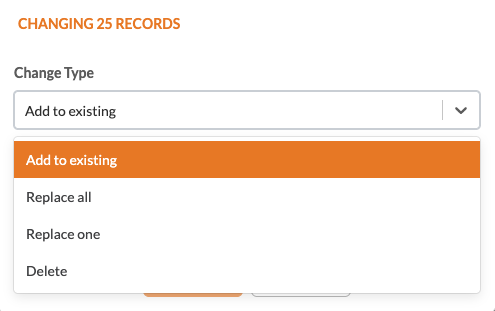
Managing tags across large groups of records is now more flexible. Instead of updating records one at a time, users can apply bulk tag actions in a way that better matches the cleanup or standardization work they need to do.
With this release, Bulk Change Tag now supports:
Adding new tags to selected records while keeping existing tags in place
Replacing all existing tags across selected records
Replacing one specific tag with another across multiple records
Deleting one or multiple selected tags without affecting the rest of the tag set
This update helps teams clean up inconsistent tagging, apply reporting tags in bulk, remove outdated tags, and standardize large record sets more quickly.
Risk Mitigation Exception Management
Release 3.10.0 adds clearer tracking for Risk Mitigation exceptions and improves how mitigation activity is reflected across findings, list views, dashboards, and exports.
New Exception and Days Opened fields
Risk Mitigation records now include:
Exception
Days Opened
The Exception field helps identify mitigation responses that require closer attention.
A Risk Mitigation record is considered an exception when:
Risk Treatment is Accept
Risk Treatment is Mitigate and the Expected Completion Date is later than the finding’s Original Due Date
The Days Opened field shows how many days the Risk Mitigation record has been open since it was created. This count stops once the record is resolved or archived.
These additions make it easier to identify higher-risk mitigation responses and monitor how long they remain active.
List view and filter improvements
Risk Mitigation list views now include:
An Exception filter for Yes/No filtering
Default columns for Exception
Default columns for RM Days Open
These updates make it easier for teams to isolate exception records, review aging mitigation items, and work directly from the list view without extra setup.
List view and bulk action improvements
Risk Mitigation list views now include:
An Exception filter for Yes/No filtering
Default columns for Exception
Default columns for RM Days Open
Bulk change support for the Approval Process
These updates make it easier for teams to isolate exception records, review aging mitigation items, and manage approval directly from the list view.

Dashboard and summary page updates
Issue Management summary pages now include reporting improvements tied to mitigation and exception tracking.
Updates include:
The Risk Mitigation chart title is changed to Finding Response for clearer context
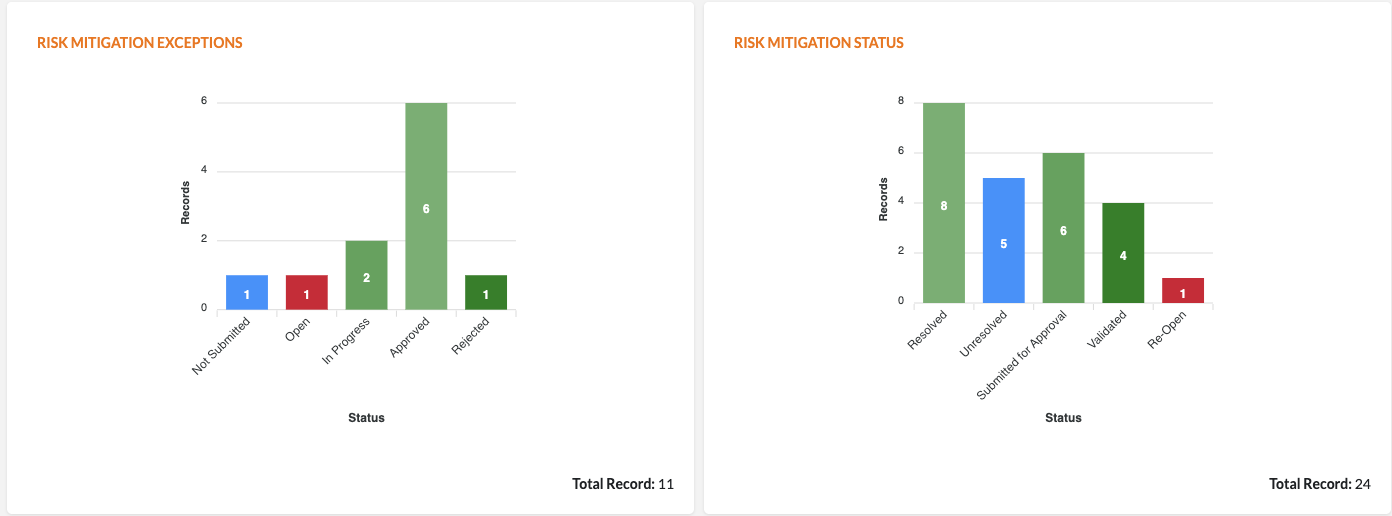
A new Risk Mitigation Exceptions chart has been added
Summary page filters now apply to the mitigation and exception charts
These changes help users understand exception activity more clearly and keep summary reporting aligned with the filters already being used on the page.
CSV export improvements
CSV exports for Risk Mitigation now include:
Exception
Days Opened
These fields appear after Expected Completion Date, making it easier to use exported data for reporting, tracking, and follow-up outside the platform.
Was this article helpful?
That’s Great!
Thank you for your feedback
Sorry! We couldn't be helpful
Thank you for your feedback
Feedback sent
We appreciate your effort and will try to fix the article